Find the way in.
Identify the engine and inspect its game files. Explore Unity IL2CPP metadata, .NET assemblies and Godot packs.
THE MOD STORE. THE MODDING STUDIO.
Discover great mods. Install and manage them in one place. Turn your wildest ideas into playable mods with AI.
Checking the latest Windows release…
Release notes & installer detailsDiscover in Mod Anything · Illustrative catalog
FIND IT. INSTALL IT. MAKE IT YOURS.
From your next download to your next big idea, everything has a place.
Actual app screens with illustrative catalog entries, example conversations and prepared projects.
FOR THE IDEA THAT WON'T LEAVE YOU ALONE
A new weapon. A world with different rules. Two games that were never meant to meet.
Tell the AI modding agent what you want to play. It can research the game, explore its code, build your changes and help test them in the real thing.
“Give me Counter-Strike weapons inside Genshin. Keep the world, movement and enemies.”An example of where a conversation can start.See what that can look like
POWERED BY REVERSE ENGINEER ANYTHING
Ambitious mods start with understanding the game. A powerful reverse-engineering framework gives your agent the tools to find how it works, then build on it.
Identify the engine and inspect its game files. Explore Unity IL2CPP metadata, .NET assemblies and Godot packs.
Use native analysis to inspect functions, pseudocode and cross-references. Follow the code behind a mechanic instead of guessing.
Search retained analysis, ask focused follow-up questions and compare builds as you develop your changes.
A FEW REASONS TO ASK “WHAT IF?”
Find your next adventure in a community mod, or start creating the one you keep imagining.
A familiar world, a very different arsenal.
Our local prototype · 6 seconds
Minecraft mobs. GTA streets. Your survival.
Our local scenario · 14 seconds
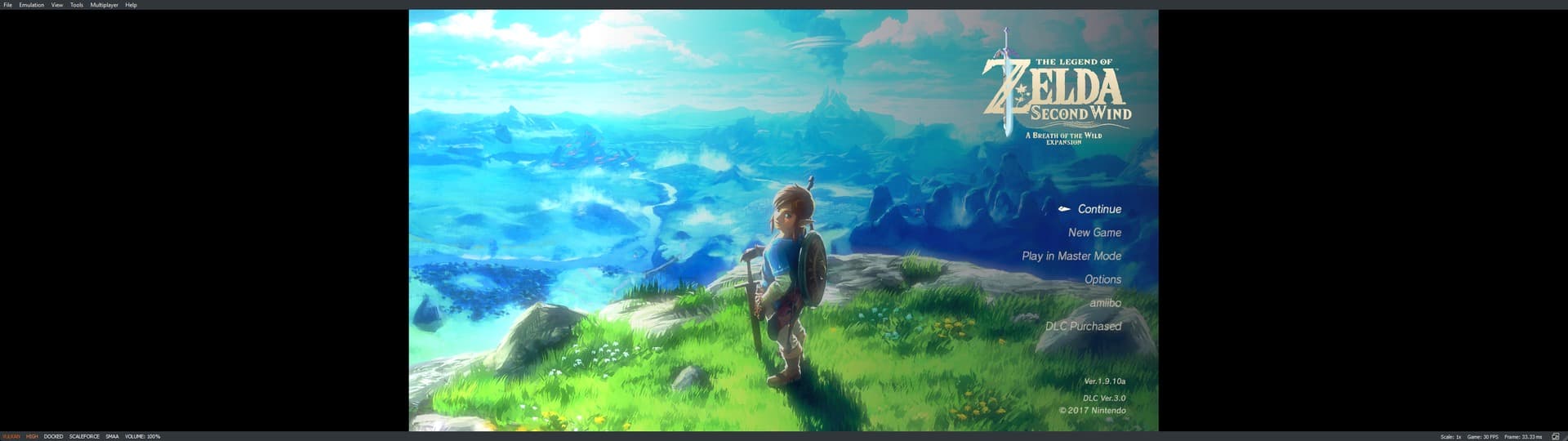
Second Wind, a community-made expansion.
Second Wind team · Local title capture
Real captures from local mod setups. Genshin × Counter-Strike is our prepared private-server prototype. Los Santos Under Siege builds on Rehan and the universal-modder contributors' Minecraft/GTA bridge. Second Wind is by the Second Wind team, using Nitr4m12's Switch release; its title and movement were tested locally. Original games and the appropriate setup are required. These examples are not a promise of universal compatibility or a bundled catalog.
START EXPLORING
Browse community releases, download shared mods, discover your installed games and organize projects. Your local workspace and bundled tools are free to use.
Use credits for AI-assisted creation, installation and supported web research. Top up when you want; no subscription required. $1 buys 1,000 credits.
Usage varies by model and request. New accounts start with zero credits.
YOUR GAMES. YOUR NEXT IDEA.
You bring the games.
We bring the workspace.
Browsing releases and scanning your library do not install mods. Installing or running a mod can change game files, settings or saves, and may conflict with mods you already use. Review the setup with the installation agent, back up saves and check the creator's compatibility notes before playing. Use a separate game profile when the game supports one.
The Windows app scans local installations from Steam, Epic and GOG. You can also choose a game folder yourself. You do not need to connect your Steam account to scan installed games; this is not a list of everything you own online.
Mods need to work with the game on your computer. The desktop app brings discovery, installation and your installed mods together, with local tools for creating and testing changes. You can download shared releases, or let the installation agent help with their game-specific setup.
You can start with an idea in plain language. The coding agent can research, write code, run builds and help you test. You stay involved in the decisions and playtests; coding experience is useful for more ambitious projects.
The app discovers games from your installed libraries and helps identify their engines and modding routes. What you can change depends on the game, version and available tools. Use games you own and supported offline or private-server setups; protected public clients are not supported.
Yes. When a creator shares editable source under a suitable license, you can continue from your own copy, customize it and preserve the original credit. Or start a new project from an idea.
Save named versions of your mod's code and assets, compare changes and continue from an earlier checkpoint. Installation actions have their own history and pre-action game-folder snapshots. Recovery restores file contents, not original file timestamps. Saves stored outside that game folder need a separate backup; a source checkpoint does not back up your saves.
YOUR NEXT FAVORITE WAY TO PLAY
Windows 10 / 11 · Local toolchain included
Release notes & installer details Wishlist on Steam